What Do ChatGPT Ads Look Like? Formats, Placement and Examples
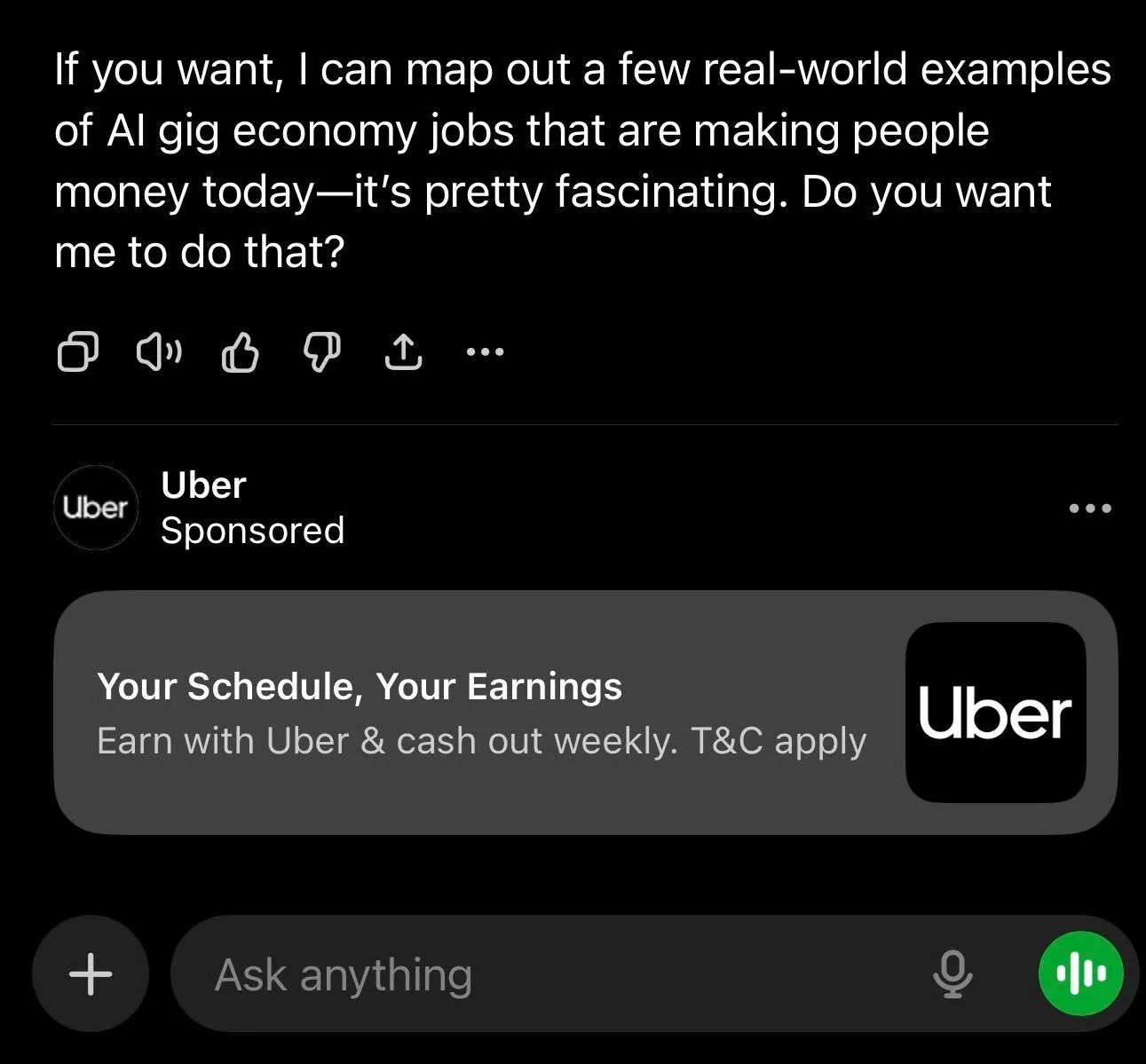
A ChatGPT ad is a small labeled card below the answer, with a logo, title, short description, image and link. It only shows when it fits the conversation.

- Key Takeaways
- Lorem ipsum dolor sit amet
- Lorem ipsum dolor sit amet
- Lorem ipsum dolor sit amet
- Lorem ipsum dolor sit amet
Let’s find the perfect ad strategy for you.
We’ll explore your current setup and see how to scale your business.
Schedule CallKey takeaways
- A standard ChatGPT ad is a small card below the answer, with the advertiser's name and logo, a title, a short description, an image and a link, clearly labeled as an ad.
- Ads show to adults on the Free and Go plans. Plus, Pro and business plans, temporary chats and sensitive conversations get no ads.
- ChatGPT picks ads mainly on how relevant they are to the conversation, using your context hints, landing page, title and description.
- The formats are growing: product cards with prices for e-commerce, visual ads next to generated images and Sponsored Agents that open a conversation after a click.
- Ads don't change ChatGPT's answers, so the ad has to earn the click on its own with a specific title, a clear image and a landing page that answers the question.
What do ChatGPT ads look like?
The standard ChatGPT ad is a compact card that sits under the answer, visually separated from it and labeled as sponsored. OpenAI lists six parts in every ad:
For example, an ad for a project management tool could read: title “Project tool for agencies under 50 people”, description “Plan client work, track hours and share timelines. Free 14-day trial, no card needed”, with the product's icon as the image. Short, specific and useful to someone who just asked ChatGPT to compare project tools.
Where do ChatGPT ads show up in a conversation?
Below ChatGPT's answer, never inside it. The ad appears after the response is written, and only under conversations where an ad is relevant, so many chats show no ad at all.
ChatGPT ad example:
There are a few exceptions to know. Ads don't appear in the ChatGPT Atlas browser during the current test. A newer format, visual ads, appears next to images that ChatGPT generates, and is being tested in the US since October 2026 (TechCrunch).
Who sees ChatGPT ads, and who doesn't?
People on the Free and Go plans see ads, including logged out visitors, who only get ads suitable for all audiences. Ads run in 89 countries.
Ads don't show to:
- Users on Plus, Pro, Business, Enterprise or Edu plans.
- Users who say or are predicted to be under 18.
- Temporary chats.
- Sensitive or brand-unsafe conversations, which OpenAI filters out.
For advertisers, that means you reach ChatGPT’s free audience, not its paying subscribers. Keep it in mind when you define your ideal customer. If you sell to enterprise executives who use ChatGPT through a company plan, there will be less inventory to reach them.
From our work: For FITINN, we ran one advertising strategy across 4 markets with advanced analytics, and online memberships grew 20%. If you advertise in several countries, plan ChatGPT the same way: one strategy, ads and landing pages per market, and results compared in one report.
How does ChatGPT decide which ad to show?
Mostly on relevance. OpenAI's ad system looks at the context and intent of the conversation, then at your context hints, landing page, title and description. When a user has ad personalization switched on, selected signals from their wider ChatGPT use count too.
Among the eligible ads, a relevance-weighted second-price auction picks the winner. That means a more relevant ad can beat a higher bid, which we cover in our guide to what ChatGPT Ads cost.
Advertisers never see the conversations. You get reports on impressions, clicks and conversions, not on what people asked.
What are context hints in ChatGPT ads?
Context hints are short descriptions of the situations where your offer is useful. You add them at the ad group level instead of keywords, and they guide which conversations your ad can match. They aren't exact match keywords, so write them as situations, not terms.
- Weak: “project management software”
- Better: “A marketing agency with 10-50 people comparing tools to plan client projects and track hours”
- Better: “A team lead moving off spreadsheets who needs a shared timeline for client deadlines”
Business Unicorn tip: I write context hints from sales calls, not from the keyword list. The questions prospects ask a sales team before they buy are usually the same ones they type into ChatGPT, often word for word. Ten hints like that beat 50 keywords pasted in as sentences.
What other ChatGPT ad formats are there?
Beyond the standard card, three formats are live or in testing:
- Product cards. For e-commerce, ads built from a product feed show the product image, name and price, and can appear as a carousel of several products. You can connect a feed in Ads Manager or through the ChatGPT Ads app for Shopify.
- Visual ads. Labeled image ads next to pictures that ChatGPT generates, in a US test with a first group of advertisers.
- Sponsored Agents. After clicking an ad, a user can open a clearly labeled conversation with an agent the business sponsors, ask follow-up questions and then go to the website. OpenAI is testing this with select US advertisers since September 2026 (PPC Land).
Sponsored Agents are the biggest change of the three. They move part of the sales conversation into ChatGPT itself, so your product facts, pricing and answers to common objections need to be written down and accurate before you can use them.
Do ads influence ChatGPT's answers?
No. OpenAI runs ads on systems separate from the chat model, and advertisers can't shape, rank or change ChatGPT's responses. Your ad appears next to the answer, never in it.
That has a practical consequence. Paying for ads won't get your brand mentioned in ChatGPT's answers. Showing up in the answer itself depends on your website, content and reputation, which is an SEO job, not an ads job. The strongest position is to do both.
What does this mean for your ad creative?
Treat every ad as a small, honest answer to the question someone just asked. In practice:
- Make the title specific. Name who it is for or what it solves, within 50 characters.
- Use the description for a new fact. A price, a feature, a trial. Don't repeat the title.
- Keep the image simple. It shows small and square, so use one product shot or a clear logo on a plain background, with no text in the image.
- Link to the page that answers the question. A product or pricing page usually converts better than your homepage.
- Run several variants per offer. Different angles let ChatGPT match your ad to more conversations.
Our step-by-step guide on how to advertise on ChatGPT covers the setup. If you'd rather have a team write, test and refresh your ads, see our ChatGPT Ads management.
Frequently asked questions
Ads appear below ChatGPT's answer, visually separated from it, with the advertiser's name and logo and a clear sponsored label. They never appear inside the answer text.
The title can have up to 50 characters and the description up to 100. The image should be square and at least 256 x 256 px.
Yes. Users control ad personalization in their settings. With it off, ads are matched to the conversation itself rather than to signals from their wider ChatGPT use.
No. Ads only show below conversations where one is relevant, never in temporary chats or sensitive topics, and never to users on Plus, Pro or business plans.
No. OpenAI keeps conversations private from advertisers. You see campaign results like impressions, clicks and conversions, but not the chats behind them.